Posts filed under ‘DNS and Bind’
How to automatically sign the RRSIG in DNSSEC Zones.
For those who are working with CRON jobs would have realized that */20 for the day place holder in crontab , will be taking the Calendar Days only or in other words 20th of Every month. However , my requirement was to run a batch job every N days since the last run. After several hours of Googling I came across this Blog (https://backreference.org/2013/08/25/run-cron-job-every-n-days/index.html.) which do exactly what I was looking for.
In this post , I will leverage this approach to renew my RRSIG once in every 25 days. Below is the extract from the original website.
====================================================================
Let’s say we want to run a job every N days, or weeks, regardless of month or year boundaries. For example, once every three tuesdays, or once every 17 days, or whatever.
Cron itself (at least the variants I have access to) has no way to specify these time periods, so it would seem this could not be done.
But there’s a simple way to do it. It is based on modular arithmetic and on the fact that we know that measurement of time on Unix starts on a concrete date, which is the well-known January the 1st, 1970 (also known as “the Epoch”). For the remainder, I’m assuming UTC and a running time of midnight for simplicity; it should be easy to consider the appropriate time differences where needed.
With this kind of requirement we need to have an actual starting date for the job, that is, when it has to run for the first time, so we can use it as a starting point for the “every N days” intervals.
Once we have an actual date of first execution for our task (say, 2013-01-15, a Tuesday, at 00:00), we can divide the time passed since the Epoch until our date into groups of N days. For this first example, let’s say N == 14, two weeks. With the following calculation we can see which place our starting day occupies in a period of 14 days (two weeks):

Dividing by 86400 gives the number of days passed since the Epoch, from which the modulo 14 is calculated. The result is 11, which tells us that at any given time, performing the above calculation using the current date will yield 11 only on $startdate, of course, and on every second Tuesday (well, every 14 days, which is the same) starting from $startdate (or going backwards from $startdate, which is not important here). Simple test code to show that it’s true:

Sample run:
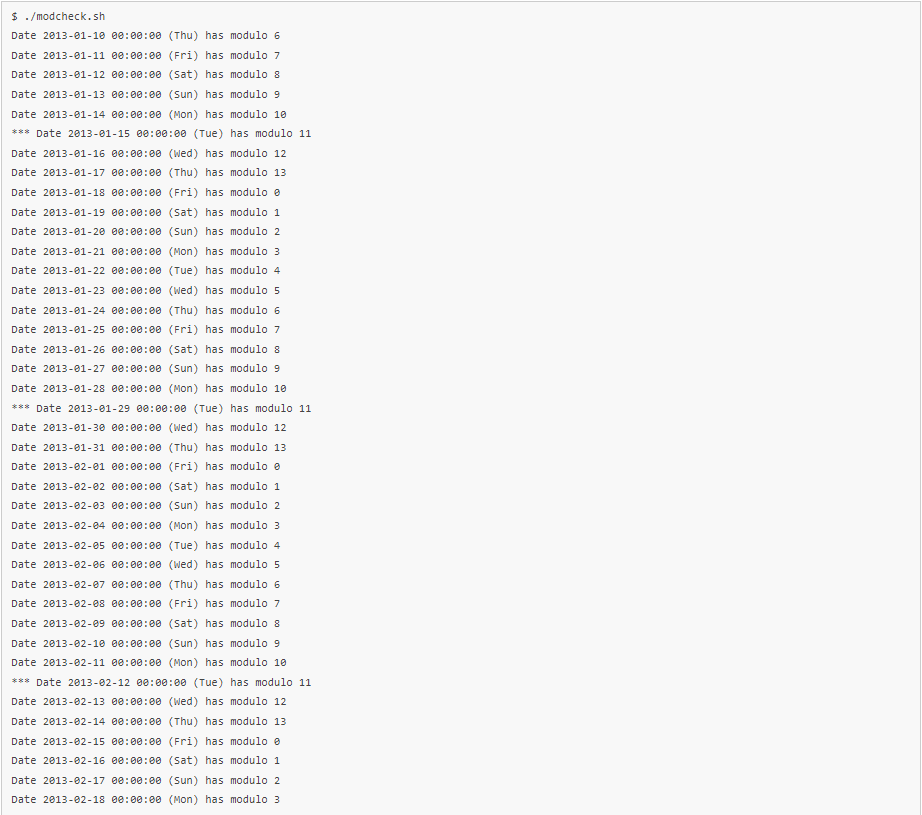
So there we have it, every second Tuesday starting from 2013-01-15. The code shown in modcheck.sh can be made generic so that values can be passed from the command line:

Another test: let’s say we want every fifth day starting from 2012-12-02. Let’s calculate the modulo first:

And let’s verify it:

So to use all this in our crons, we need to know the starting date, the frequency (every N days) and calculate the modulo. Once the modulo is known, we run the job if the modulo calculated for “now” (when the job is invoked) matches the modulo we want. So for instance if the period is 13 days and the modulo we want is 6, in our script we do:

Or as usual it can also be done in the crontab itself so the script does not need to have special knowledge (it may not even be a script, so in that case the check would have to be external anyway):

Note: so far, it doesn’t seem to have trouble with DST time changes. Corrections welcome.
====================================================================
Below is a screenshot of my Crontab , I am using to resign the RRSIG once in 25 Days.

That’s it and Let me know your thoughts in the comments section.
How do I flush or delete incorrect records from my recursive server cache?
Sometimes a recursive server may have incorrect records in its cache. These may be as a result of an error made by a zone administrator, or as a result of a deliberately engineered cache poisoning attack.
To identify the faulty records, by dumping and inspecting cache:
rndc dumpdb -all
grep problem.domain /var/named/data/cache_dump.db

(The location of the cache_dump.db may be varied based on the bind configuration)
Or you may be able to identify which records are incorrect by querying your server directly.
dig +norec <ip address of nameserver> <name> <type>
How to solve the problem?
rndc flushname name
- Use the name of a domain if there are problems with the NS or MX records associated with it.
- Use the server name, if there are problems with the addresses associated with that server name (for example a nameserver, a webserver or a mailserver).
Flush the cache for a specific name as well as all records below that name
rndc flushtree name
- This will clear the cache, but it will not clear any names out of ADB, so may not be sufficient for some needs.
If you are not sure where the problem lies, or there are too many records to delete them individually, then you might prefer to:Flush the entire named cache
rndc flush && rndc reload
How to troubleshoot DNS Issues with Wireshark
Hi Folks
Until recently I was a big fan Microsoft Message Analyzer. Unfortunately , Microsoft deprecated the product.So I decided to switch to Wireshark. I will not be going through the basic operations of wireshark as there are plenty of good video tutorials on the Internet.
In this article , I will focus on how to capture DNS packets on a BIND server and filter the packets for known queries and the response codes.
Step1: Start the capture on the BIND server

Step2: After running sample queries , Press CTRL & C to end the capture and transfer the .pcap file to the wireshark.
Once you open the .pcap file in the Wireshark , you can use the below filters to display the required data.
** To filter based on the queried domain name **
dns.qry.name == “hotmail.com”
** To filter MX queries **
dns.qry.type == 15
** To filter SERVFAIL response **
dns.flags.rcode == 2
You could use ! to exclude a filter in the search for example to exclude dns.qry.type == 15
!dns.qry.type == 15
For detailed list of DNS Response Codes & other DNS parameters refer the below URL’s.
https://www.iana.org/assignments/dns-parameters/dns-parameters.xhtml
Good Luck.
Sub Domain Delegation using Bind
Hi All
When you are administrating the Bind you may come across to host a sub domain delegated to another DNS server from a different provider.These requests are usually from the Web Hosting Provider which helps them to modify the required records on their own using their Name Server.
In this scenario open the zone file in for eg:- test.com and add the following lines ( Adding Sub domain “sample.test.com”)
;Sub Doman delegation for the domain sample.test.com
$ORIGIN sample.test.com.
@ NS ns1.webhost.com. (Other DNS Severs , you could add multiple lines of DNS servers)
NS ns2.webhost.com.
Regards
How to force the DNS Propogation by changing the TTL Values
Hi
I am writing this tip for DNS Administrators who wants to speed up porpogation changes by playing with TTL (Time to live) values For Eg:-
Assuming that you are changing the IP Address of http://www.test.com by default the Bind (Linux based DNS Server) the TTL Value is set for 7200 which is 2 hours as a global parameter.which will control the expiry time / refressh interval for your DNS records in other DNS servers cache .
Therefore if you want to change the TTL value only for the http://www.test.com as 5 minutes you could edit the ZONE file as follows
$ORIGIN test.com
www 300 A 1.1.1.1(Replace it with your Actual IP Address)
(here 300 denotes 5 Minutes )and restart the named services.
Same concept is applicable for the Windows based DNS Servers as well//
 Hope you like it..