Archive for May, 2013
How to Disable IPV6 on Windows
Dear Folks
Some of us will encounter the below error message on a DNS server installed on Windows 2008 / 2012

But this is not a real problem ,and there will be no technical glitches based on this also Microsoft do not recommend disabling the IPV6 on Windows and Exchange servers.
Still if you want to hide this error you could do either of the below option
Option 1
1.identify the name of the LAN connection using ipconfig(in my LAB the name of the connection is “Local Area Connection”
2. netsh interface ipv6 delete dnsserver “Local Area Connection” ::1
Option2
1.netsh interface ipv6 show interfaces
2.netsh interface ipv6 delete dnsserver name=”IDX#” address=::1
NOTE:- Keep reading on IPV6 and Microsoft guidelines and discussion since these are getting updated frequently
Good Luck..
Active Directory Domain Servers could not transfer the remainig data in directory partiiton
Hi
Recently I faced an issue with one of our clients where he was unable to run the DCPromo to demote the server , he was getting the below error.
The server operating system was Windows 2008 R2.

After some research I found out that the reason is that the fsMORoleOwner attribute was pointing to an incorrect entry ,it may contain an entry such as “0ADEL:123456f8-1238-1233-1230-123456361b8b” But the actual FSMO role owner is dc1.test.local.
I was trying to change the attribute via ADSI Edit on the server which I need to demote , But again I was faced with the below error.
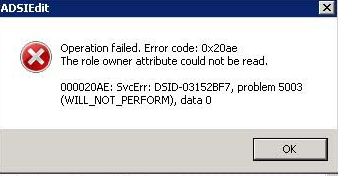
So if anybody faces a similar incident , they should do the below steps. by log in to the current domain controller which was holding the schema master role
* Identify the current FSMO Role Owner by
netdom /query fsmo
1 Login to the current owner , and open the ADSI Edit
2 Connect to the DC=ForestDnsZones,DC=test,DC=lab
3 Right click on CN=Infrastructure go to Properties
4 On CN=Infrastructure Properties click on fsMORoleOwner attribute and click on edit you will find an incorrect entry as below 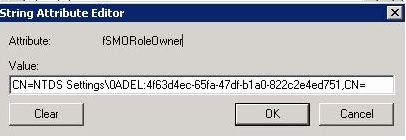
5 Clear the text and enter the below text.
CN=NTDS Settings,CN=dc,CN=Servers,CN=HeadOffice,CN=Sites,CN=Configuration,DC=test,DC=local.
After the above steps repeat the step2 to connect it to the DC=DomainDnsZones,DC=test,DC=lab and repeat the steps 3,4 & 5
Voila Press OK and close the ADSI Edit and now login to the server where you want to demote and run the DCPromo command and now you will be able to complete the wizard without any error
“I would like to thank “Antonie Khater” for his blog entry which was really helping me to focus in to the right direction”
 Hope you like it..